

TL;DR Managing money can be overwhelming — especially when you’re juggling multiple financial goals like paying off debt, saving for travel, or building an emergency fund. That’s where a Notion savings planner template comes in. It’s an all-in-one digital solution to help you budget effectively, visualize your goals, and stay consistent with your savings habits. Whether you’re working toward a short-term milestone or long-term financial freedom, this planner provides structure, clarity, and motivation.
Key Takeaways:
- A Notion savings planner template helps you organize and visualize financial goals in one place.
- You can automate expense tracking, budget calculations, and progress tracking.
- Customizing your template ensures it aligns with your personal financial style.
- Using a digital planner boosts financial discipline and reduces stress.
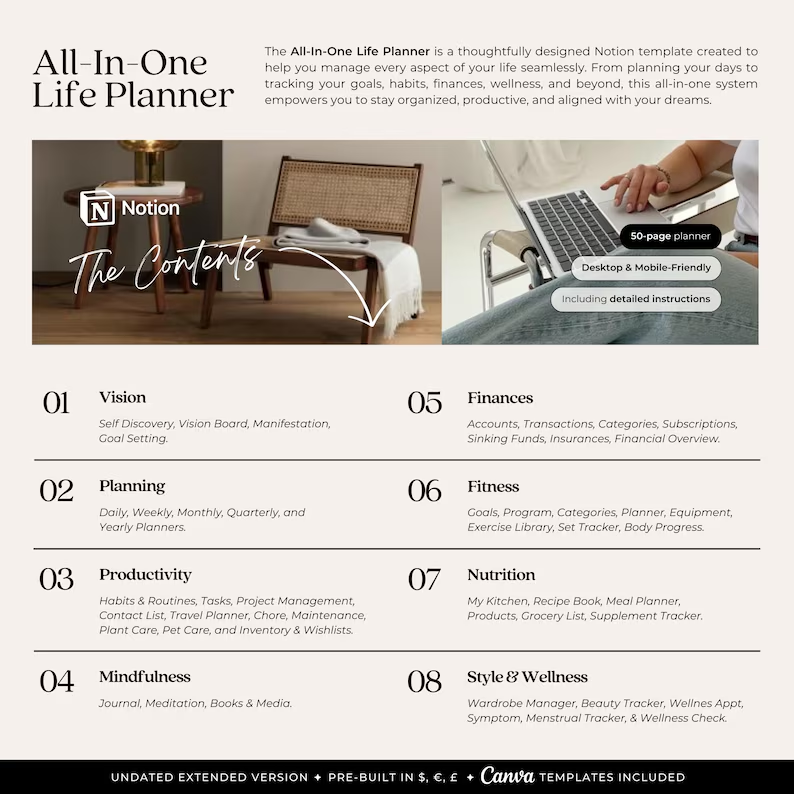
- The All-in-One Life Planner Template integrates savings, goals, and productivity in one system.
What Is a Notion Savings Planner Template?
A Notion savings planner template is a customizable digital dashboard designed to help you track your income, expenses, and savings goals. It provides visual insights through progress bars, tables, and trackers that help you understand where your money is going and how close you are to your goals. The best part? It’s completely adaptable — whether you’re saving for a vacation, an emergency fund, or retirement.
The All-in-One Life Planner Template is one of the most comprehensive tools available. It includes integrated sections for budgeting, financial goals, and productivity planning — giving you a holistic approach to managing your life and money.
Why You Need a Notion Savings Planner
A traditional spreadsheet can get messy fast. Notion offers an interactive, flexible, and visually engaging alternative. Here’s why switching to a digital savings planner makes sense:
- Centralized Financial Management – Track everything from income and expenses to savings goals in one Notion workspace.
- Automation Features – Use Notion formulas to automatically calculate totals, progress, and remaining balances.
- Goal Visualization – Visual dashboards make it easy to see progress toward each savings milestone.
- Accessible Anywhere – Whether you’re on desktop or mobile, you can update your planner on the go.
- Motivational Progress Tracking – Seeing your savings grow keeps you motivated and disciplined.
If you want a pre-designed, customizable layout that saves hours of setup time, check out the All-in-One Life Planner Template — it’s crafted to help you stay financially organized and productive.

How to Use a Notion Savings Planner Template Effectively
Step 1: Set Clear Financial Goals
Start by defining what you’re saving for. Assign each goal a name, target amount, and deadline. Examples include:
- Emergency fund ($5,000 by December)
- Vacation savings ($2,000 by June)
- Home renovation fund ($10,000 by next year)
Step 2: Track Income and Expenses
Input your monthly income and categorize expenses. This helps you identify where your money goes and where you can cut back.
Step 3: Create a Savings Tracker
Use Notion’s database properties to calculate how much you’ve saved and what’s left. Include percentage progress bars for visual motivation.
Step 4: Automate Calculations
Incorporate Notion formulas for automatic balance updates. For example, Remaining = Goal - Saved keeps your numbers accurate without manual input.
Step 5: Review Monthly
At the end of each month, assess what worked and adjust your strategy. Regular reviews keep you accountable and help you stay on track.
For a complete system that integrates savings tracking with daily planning, grab the All-in-One Life Planner Template — perfect for building financial consistency and aligning your goals with your lifestyle.
Features to Include in Your Notion Savings Planner Template
To make your savings planner truly effective, include these elements:
- Monthly Income Tracker – Logs your main income sources.
- Expense Database – Categorizes spending (bills, groceries, entertainment, etc.).
- Savings Goals Dashboard – Displays all goals with progress bars.
- Net Worth Calculator – Tracks total assets vs. liabilities.
- Debt Repayment Tracker – Monitors progress on loans or credit cards.
- Automated Calculations – Keeps your data accurate.
- Yearly Summary – Provides an overview of your annual financial progress.
These features are already built into the All-in-One Life Planner Template — saving you the effort of building from scratch.

Benefits of Using a Notion Savings Planner Template
1. Increased Financial Awareness
Understanding exactly where your money goes creates accountability and helps you build better habits.
2. Streamlined Budgeting
No need to juggle multiple apps. Everything — from savings targets to monthly budgets — exists in one central dashboard.
3. Motivation Through Visualization
Progress bars, milestones, and charts keep you motivated as you watch your financial goals come to life.
4. Reduced Stress
When your finances are organized, money management becomes less intimidating and more strategic.
5. Integration with Other Life Goals
Combine your financial goals with personal and professional planning using the All-in-One Life Planner Template. It connects your budget, tasks, and life goals in one cohesive space.
How to Customize Your Notion Savings Planner
You can personalize your planner by:
- Adding icons and emojis for each goal category
- Using color coding for quick identification
- Creating filters for specific goals (e.g., “High Priority Savings”)
- Embedding financial widgets or charts for deeper insights
Common Mistakes to Avoid When Using a Savings Planner
- Ignoring Small Expenses: Small purchases can quickly add up. Track them all.
- Setting Unrealistic Goals: Start small and scale up.
- Not Reviewing Progress: Schedule weekly or monthly reviews.
- Overcomplicating the System: Keep your setup simple for consistent use.
How the All-in-One Life Planner Template Enhances Your Savings Journey
While a basic Notion savings template is great, the All-in-One Life Planner Template elevates your productivity and goal achievement. It connects your savings tracker with your daily planner, goal-setting dashboard, and productivity system — making your entire financial journey more efficient. This template is ideal for entrepreneurs, students, or professionals who want to build wealth while staying organized.
FAQ
1. How do I start saving with a Notion planner template?
Begin by listing your financial goals, inputting your income and expenses, and tracking progress using formulas or prebuilt templates.
2. Can I use a Notion savings planner for business budgeting?
Absolutely. You can create categories for business expenses, income, and savings targets just like personal finance.
3. Are there free Notion savings templates available?
Yes, though premium options like the All-in-One Life Planner Template offer advanced features and professional design.
4. How do I stay consistent with savings tracking?
Set reminders within Notion or tie your review schedule to your weekly planning routine.
5. What’s the best Notion savings planner for beginners?
The All-in-One Life Planner Template is beginner-friendly, pre-built, and designed to integrate all aspects of financial and personal planning.
Final Thoughts
A Notion savings planner template is more than a digital budget tool — it’s your roadmap to financial success. By tracking, visualizing, and reviewing your goals, you take control of your financial destiny. For a complete, easy-to-use system that blends savings management with life organization, grab the All-in-One Life Planner Template today and start building your financial freedom with clarity and confidence.